Taking NATE Online
We have recently begun teaching our NATE classes online using zoom format. This article will hopefully clear up some of

Coming back to work after an extended weekend of 4th of July there’s paperwork handed to you for the emergency installation of a system in an elderly person’s home. It’s to replace the existing system with a more efficient slim duct indoor unit paired with a ductless mini-split condenser.
You try to be as clean as possible not to leave dirty boot prints, the carpet is already stained and dirty, but you don’t want to contribute to the problem. This keeps the customer for next time, if not for life, and they notice this.
To stick with keeping things clean, you clean up the workspace while you let the system run for testing. Garbage is all cleaned up including the paperwork and any unneeded accessories for the installation. No one reads the paperwork anyway with the use of apps on phones these days, right? Right? WRONG!
Fast forward 6 months. The customer calls that their home isn’t heating and your company stands by their work. They send out a service technician to investigate free of charge. The system is new, nothing “SHOULD” be wrong.
The service technician’s phone is dead after running service calls all day. This leaves the technician without a fallback for error codes indications, troubleshooting trees, and wiring diagrams for the system. The technician calls their local Mingledorff’s Technical Support team for help. They must walk through the entire system using the exact manuals “someone” threw away.
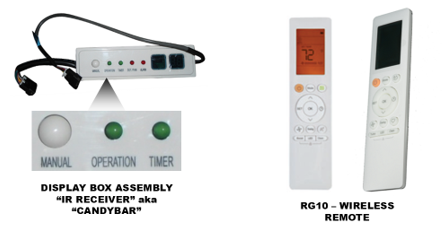
After some time, it’s determined that the thermostat, wiring, or Indoor unit’s board is the root cause. Technical Support asks if they have the original wireless remote and a “candy bar” IR receiver on site. Without the remote or the IR receiver there isn’t a way to fully diagnose the system or manually get it into operation to test it. This becomes a guessing game of throwing parts at a new system to see what works. A snowball effect stemming from day 1 at install.
Leaving the documentation and accessories on the jobsite in the original bag can lead to less time spent diagnosing a system and could also be the tipping point of whether a system can manually limp along.
How this should have gone:
With the proper tools left from the install on site, the technician was able to wire in the IR Receiver to see there was a communication error code between the indoor unit and the thermostat. They were then able to unwire the wall thermostat and test it using the wireless remote and the IR module. The cause was then limited down to the wire or wall thermostat. Technician was able to ohm out the wire and found a picture frame was hung recently over the thermostat and had damaged the wire within the wall. Until new wire could be run the thermostat was left unwired and the system set to run automatically using the manual button on the IR module. The system will maintain its set point without a wired remote attached using the return air sensor built into the unit.
The process took less than 30 mins to check and get back running rather than the hours the prior scenario took to come to the exact same outcome. Customers were just happy to have their heat back on, even if they couldn’t control it for now. This leads to better customer relationships and efficiency of time spent on service calls.
Please leave manuals and accessory items with the install rather than throwing them away. Your service technician and Mingledorff’s Technical Support team will thank you greatly.
Disclaimer: The technical statements, information and recommendations contained herein are believed to be accurate as of the date hereof, but Mingledorff’s does not make representations or warranties, express or implied, as to its accuracy, its completeness, or the results to be obtained. The information is being provided for informational purposes only and is intended for use by persons having adequate skill and expertise regarding the proper selection, use and application of the products and recommendations and at their own risk and discretion.
We have recently begun teaching our NATE classes online using zoom format. This article will hopefully clear up some of
Carrier has approved the use of Crossover equipment with zoning applications. The instructions for this will be released in several phases during 2026. Release dates for
Tip: click the images to open an enlarged view in another tab. Close the tab to return to the article.
We use cookies and other tracking technologies to collect and store information, operate our website, remember your preferences, deliver targeted ads and content, and enhance your experience. You can manage or change your cookie preferences at any time through your browser or device settings. To learn more, including how we collect, use, or disclose your information, please review our Privacy Policy and Terms of Use. By interacting with this cookie banner or accessing the site, you consent to our Privacy Policy and Terms of Use, including the arbitration provision and class action waiver.
You are leaving our site and we cannot be held responsible for the content of external websites.