Taking NATE Online
We have recently begun teaching our NATE classes online using zoom format. This article will hopefully clear up some of


In today’s world of computers, smartphones, electronic devices they require updates for them to operate correctly. The same applies to the HVAC Industry, with units having controllers with software programs that need updates from time to time. In this article we will talk about the process to update the software in the SystemVu controller. The SystemVu is available in the following Models: 48/50FC, 48/50/GC, and 48/50LC.
The SystemVu Software Update Process in simple, below is listed the items that are needed to complete this process.
In HVACPartners>Dashboard>Post-Sales-Support>Service Software
Now that you have the latest software on your USB Drive you are ready to begin to update the controller. Be sure to record your model and serial numbers, you will need them later. Once the USB Thumb Drive is inserted into the USB socket, the device will ask if want to use the USB Options?
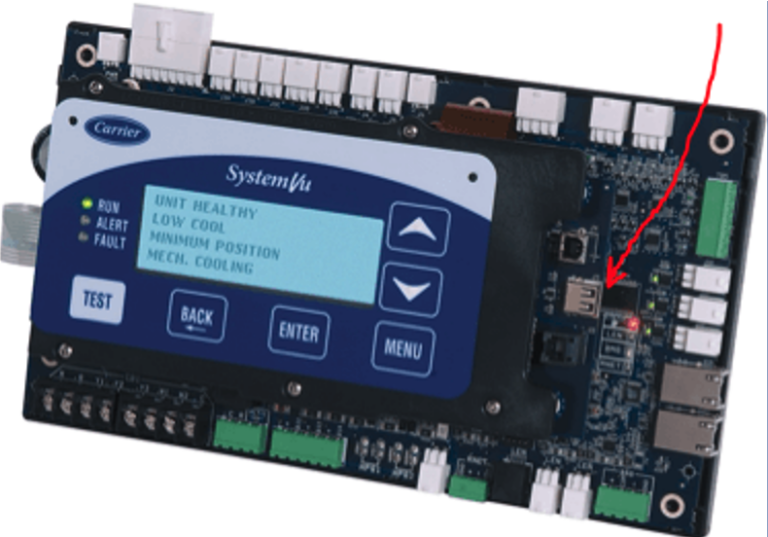
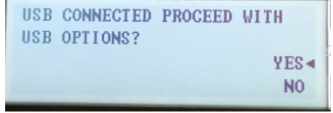
Select Yes with the up and down arrows, the press Enter.
The USB Options has 5 options as shown below:
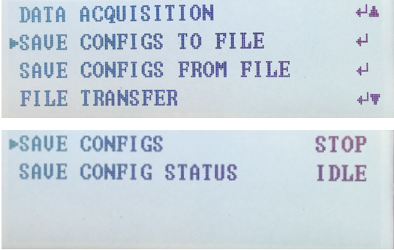
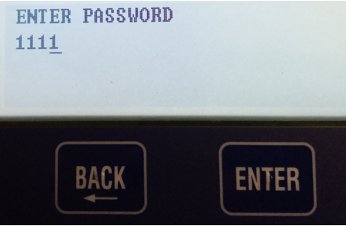
Each of the USB Options require a user login. When prompted to Log In, with the ENTER PASSWORD screen. Use the Up arrow twice to change each star to a 1 then press ENTER- do this for all characters.

Once you have logged in, you will need to save the equipment current configurations by choosing: “SAVE CONFIGS TO A FILE”. Align the arrow on the SAVE CONFIGS TO FILE option and press ENTER. Then press ENTER to make the STOP flash, use the UP or DOWN arrows to change the STOP to START and press ENTER. Once this is done, Choose Option 5 to UPGRADE SOFTWARE. Then scroll down to “FIND APPLICATION FILE” and press ENTER to change NO to YES.
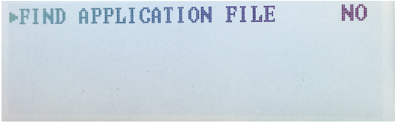
Then press ENTER to choose the USB Product Folders:
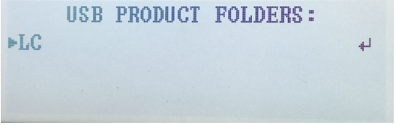
Then select the Product Software: Once selected press ENTER.
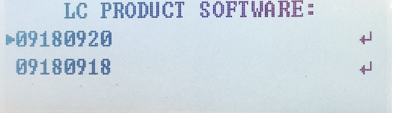
The update process will start. This will take a few minutes.
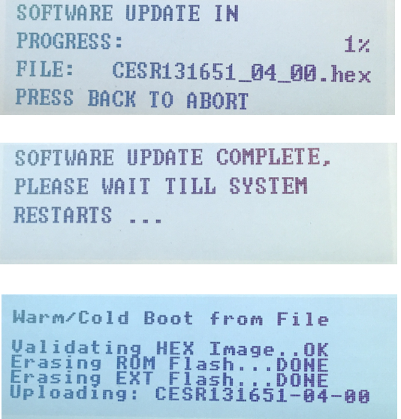
When all the files have transferred the device will restart and installed the update. Once the device has started up you need to verify that Model Number, Serial Number, and other parameters were retained. From the Main Menu select SERVICE, then select UNIT INFORMATION to see if the update retains your model and serial number. Then select SAVE CONFIGS FILE and select YES to find the .CSV file with same last four numbers of the serial number. This will restore the configurations saved prior to the update.
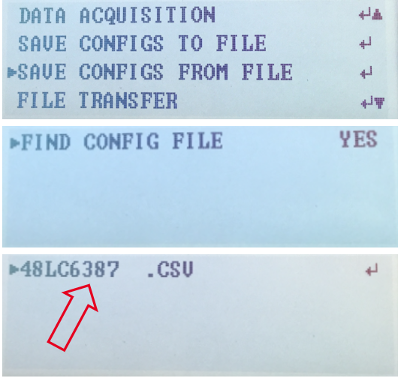
Press Enter and the congregations will be restored. The update process is now completed. The system will should operate normally. You have successfully updated the software for your SystemVu.
Sources:
HVAC Partners
Disclaimer: The technical statements, information and recommendations contained herein are believed to be accurate as of the date hereof, but Mingledorff’s does not make representations or warranties, express or implied, as to its accuracy, its completeness, or the results to be obtained. The information is being provided for informational purposes only and is intended for use by persons having adequate skill and expertise regarding the proper selection, use and application of the products and recommendations and at their own risk and discretion.
We have recently begun teaching our NATE classes online using zoom format. This article will hopefully clear up some of
Coming back to work after an extended weekend of 4th of July there’s paperwork handed to you for the emergency
Carrier has approved the use of Crossover equipment with zoning applications. The instructions for this will be released in several phases during 2026. Release dates for
We use cookies and other tracking technologies to collect and store information, operate our website, remember your preferences, deliver targeted ads and content, and enhance your experience. You can manage or change your cookie preferences at any time through your browser or device settings. To learn more, including how we collect, use, or disclose your information, please review our Privacy Policy and Terms of Use. By interacting with this cookie banner or accessing the site, you consent to our Privacy Policy and Terms of Use, including the arbitration provision and class action waiver.
You are leaving our site and we cannot be held responsible for the content of external websites.