


Kevin Livingston

Technical Services Manager North Georgia District

November 2, 2026

Training Help: How to Set Up a ZOOM Account to Take Online Classes

Create a Zoom Account and Sign In

To create a Zoom account and sign in to a Zoom invitation, connect to the internet, open your browser, and follow these steps:


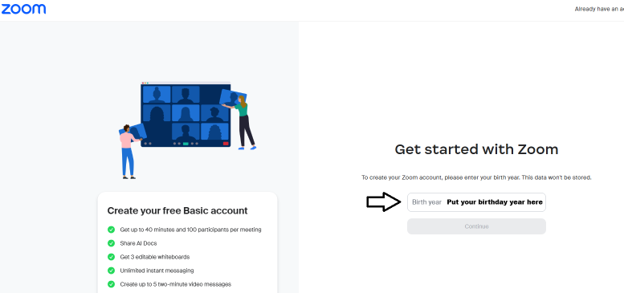
1. Go to Zoom sign up and enter your date of birth.

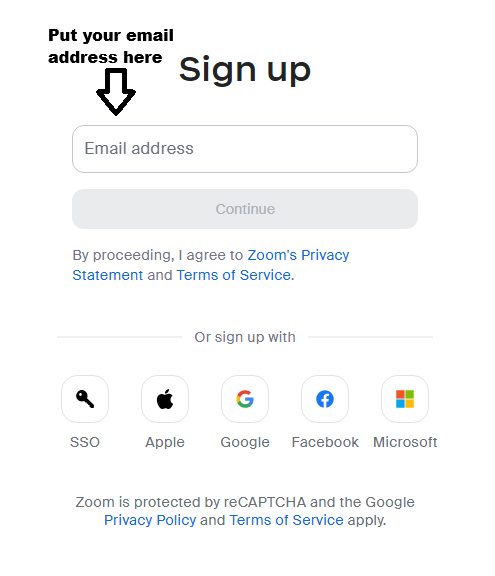
2. Enter your email address, or select Google, Apple, or Microsoft to use an existing account.

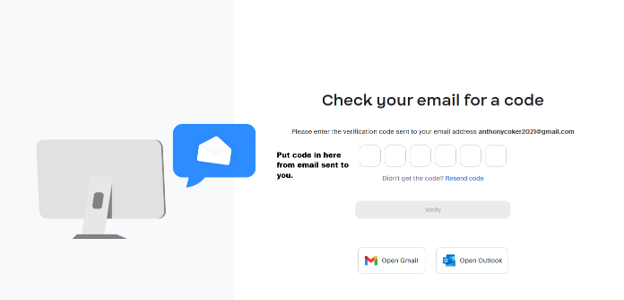
3. Check your email for a message from Zoom. Enter the verification code or select the activation link provided.

4. Enter your first and last name, create a password, and select Continue. You can skip the “invite colleagues” step.

5. Once your account is set up, go to Zoom sign in and enter your email address and password. You can also select Sign In in the Zoom app.

The free plan is sufficient for joining meetings. Meetings you host on the free plan are limited to 40 minutes each.


Test Your Equipment Before Class or an Exam

• After setting up your account, visit the Zoom Test Page to check your microphone, speaker, and camera.

• Follow the on-screen prompts to confirm that your audio and video work properly before your online class or exam.


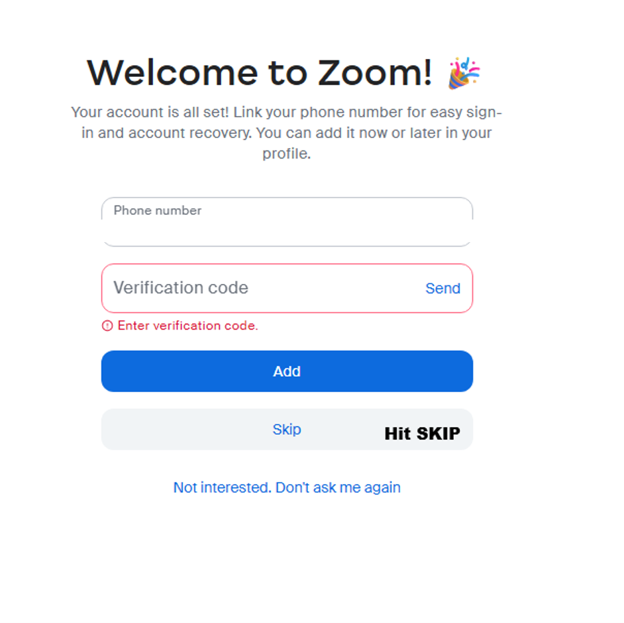
The screenshots below illustrate each step to make Zoom setup easier to follow.


Disclaimer: The technical statements, information and recommendations contained herein are believed to be accurate as of the date hereof, but Mingledorff’s does not make representations or warranties, express or implied, as to its accuracy, its completeness, or the results to be obtained. The information is being provided for informational purposes only and is intended for use by persons having adequate skill and expertise regarding the proper selection, use and application of the products and recommendations and at their own risk and discretion. 



More to Explore

By John Brown • November 5, 2026
Disclaimer: The technical statements, information and recommendations contained herein are believed to be accurate as of the date hereof, but Mingledorff’s does not make representations or warranties, express or implied, as to its accuracy, its completeness, or the results to be obtained. The information is being provided for informational purposes only and is intended for use by persons having adequate skill and expertise regarding the proper selection, use and application of the products and recommendations and at their own risk and discretion. 
By Jesse Van Atta • November 2, 2026
Disclaimer: The technical statements, information and recommendations contained herein are believed to be accurate as of the date hereof, but Mingledorff’s does not make representations or warranties, express or implied, as to its accuracy, its completeness, or the results to be obtained. The information is being provided for informational purposes only and is intended for use by persons having adequate skill and expertise regarding the proper selection, use and application of the products and recommendations and at their own risk and discretion.