
Kevin Thigpen

Technical Services Manager North Alabama District

October 15, 2025

How to Program an NFC Control Board

When replacing a control board equipped with Near Field Communication (NFC) capabilities, it’s critical to ensure that the new board is correctly programmed before attempting to operate the furnace. Each model is designed to operate with a specific Model Program Number, which defines the configuration and control logic for that unit. Programming the new control board with the correct program is essential for safe and proper furnace function.


Failure to program the board, or programming it with the wrong Model Program Number, can result in improper operation, system faults, or even damage to the furnace components. Always refer to the Model Program Number listed on the furnace rating plate, typically found on or near the burner compartment door. This number is unique to the furnace model and ensures compatibility between the control board and the rest of the system.


This article will walk you through the necessary steps to program a new NFC-enabled control board accurately using a simple step-by step guide.


The board can be programmed before it’s installed in the unit or after you have installed it. It is important to note that if you are choosing to program the board after installation, you must make sure that it is disconnected from power prior to beginning the programming process.


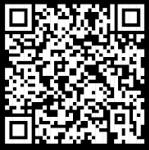
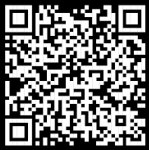
You will program the board using the Open Service APP. Below, you will find the QR codes for both the Carrier and Bryant versions. If you are on mobile, you may click the QR code to be taken to the app store. Once downloaded, you will be prompted to sing in. If you don’t have an HVAC Partners ID, you may continue as a guest.

Black-and-white QR code on a white background

Carrier Open Service App

Black-and-white QR code square with a central patterned design

Bryant Open Service App

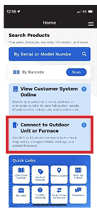
Mobile app home screen with search bar, blue promo cards, and quick-link tiles; one card is highlighted red.
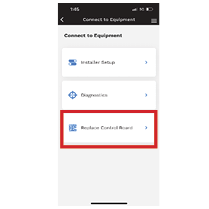
Mobile app screen titled “Connect to Equipment” with the “Reducer Control Panel” option highlighted in red.
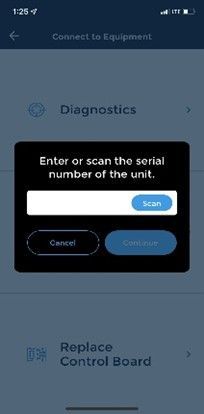
Mobile app screen showing a dialog to enter or scan a unit serial number, with Cancel and Continue buttons.
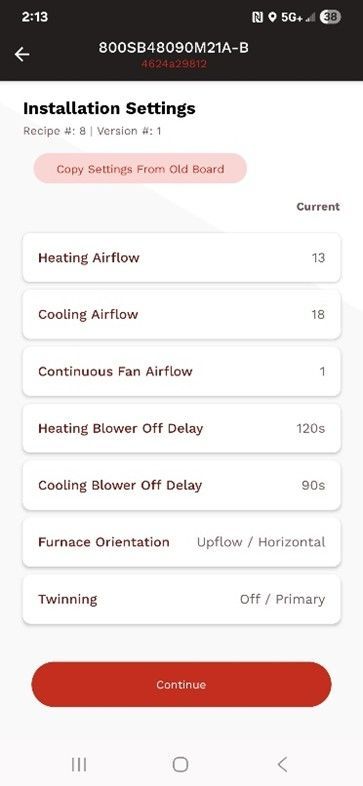
Mobile app “Installation Settings” screen with a red warning banner and a list of airflow/direction settings.
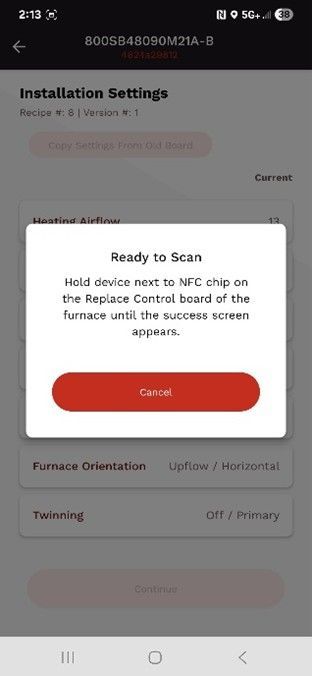
Phone screen showing an Installation Settings page with a centered “Ready to Scan” popup and a red Cancel button.
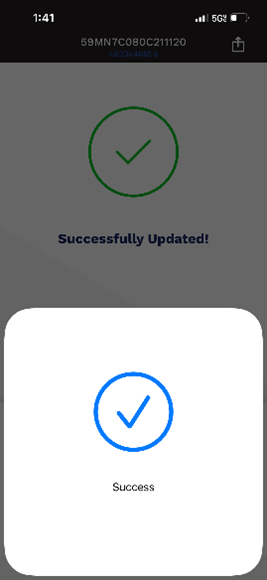
Mobile app success confirmation screen with green checkmark and “Successfully Updated!” text.

This guide should help you program your new furnace board. remember, the board may be out of the furnace or already installed, but it must be disconnected from the power source. Should you have any questions, please do not hesitate to contact the Technical Services Team for further guidance.


Once your board is programmed, you may adjust the blower speed while the furnace is running. For guidance adjusting the blower motor speed, reference our previous article titled: “How to Change the Blower Speed on an 820TB Furnace with a HKFZ NFC Furnace Board.


Disclaimer: The technical statements, information and recommendations contained herein are believed to be accurate as of the date hereof, but Mingledorff’s does not make representations or warranties, express or implied, as to its accuracy, its completeness, or the results to be obtained. The information is being provided for informational purposes only and is intended for use by persons having adequate skill and expertise regarding the proper selection, use and application of the products and recommendations and at their own risk and discretion.


More to Explore

September 16, 2026
Disclaimer: The technical statements, information and recommendations contained herein are believed to be accurate as of the date hereof, but Mingledorff’s does not make representations or warranties, express or implied, as to its accuracy, its completeness, or the results to be obtained. The information is being provided for informational purposes only and is intended for use by persons having adequate skill and expertise regarding the proper selection, use and application of the products and recommendations and at their own risk and discretion. 
By Jesse Van Atta September 16, 2026
Disclaimer: The technical statements, information and recommendations contained herein are believed to be accurate as of the date hereof, but Mingledorff’s does not make representations or warranties, express or implied, as to its accuracy, its completeness, or the results to be obtained. The information is being provided for informational purposes only and is intended for use by persons having adequate skill and expertise regarding the proper selection, use and application of the products and recommendations and at their own risk and discretion.