
It is a good practice to make sure all of your dip switches are set to the factory position on all of your flow selector boxes during installation. If the dip switches are not set in the factory position you will have L11 and E17 error codes to follow. You can verify the factory dip switch settings by looking at access door on the flow selector box. The L11 and E17 error codes can also be caused by wiring issues, good wiring practices can prevent having problems.


Changing dip switches on your flow selectors is not necessary because all of your flow selector addresses and port numbers are set using and codes 00FE and 0105 on your thermostat. Making sure your flow selector address and your flow selector port address is correct will make the start up process much easier. If care is taken and you have a good understanding of the wiring and installation of a VRF system the start up process can be close to seamless.


L11- Detected indoor unit address, Flow selector unit not connected.


E17- Communication trouble between indoor unit and flow selector unit.

John Brown

Equipment Verification Technician • Southeast Region

June 10, 2024

Installing Carrier VRF Part 3

Last month we covered how to electronically address a system. But why? What is the importance of this? Let’s find out.


When you are installing a VRF system there are typically many moving parts in terms of communication and control. Electronic address allows ODU, Touch Screen, and Bac-Net to see what a particular unit is doing. Again, an identifier.

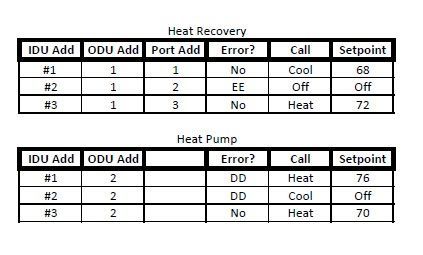
Table showing heat recovery and heat pump settings with IDU/ODU add, errors, calls, and setpoints.

From the above picture you can see the electronic address #2 on ODU #1 is off on an EE error and ODU #2 has 2 errors of DD. EE is a water trouble, probably a clogged drain or something wrong with the pump (if equipped). DD is a mode conflict on Heat Pump systems when 2 units are in different modes. This can also happen on Heat Recovery when 2 ports are merged on the MDC box trying to run in different modes.


This information will show on not only the units themselves but also the Touch Screen and Bac-Net. With proper documentation during install these problems can be easily found and solved when it is time to troubleshoot.


40VM90006

Blue “Install” setup screen with a red circle highlighting the “Local” tab in a device list menu

40VM90006A

Install screen with Auto Topology dialog showing a device list and Save button.

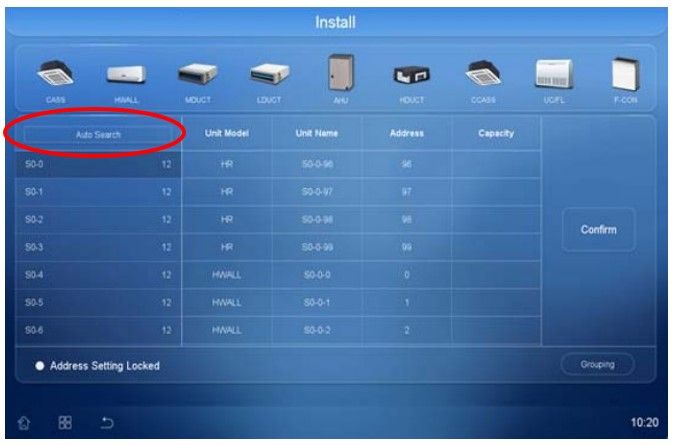
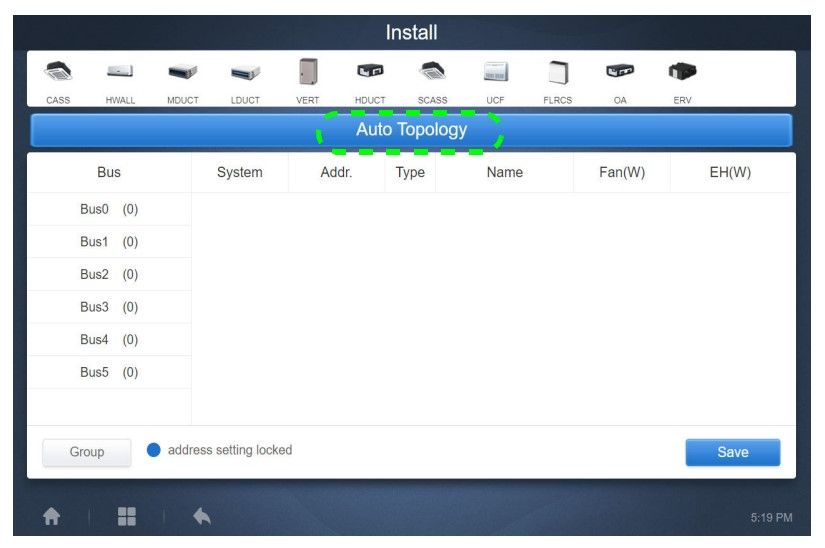
When pulling units into a central controller pictured above the electronic addresses are where everything comes in and ties together in the INSTALL MENU. From this point you can manually control the system by ODU, IDU, or as an entire group. If duplicate addresses or aren’t set, they won’t pull into the touchscreen and ultimately Bac-Net. This is where everything ties together and works in sync with each other.


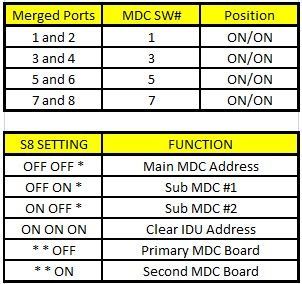
One other thing to keep in mind is when installing a Heat Recovery is if there is more than one MDC box than the Sub-MDC needs to be addressed via the S8 dipswitch and if there are any merged copper ports. If copper ports are being merged for any reason than the corresponding switches need changed.


Here is some information regarding MDC address and copper port merge:

Table showing MDC switch settings, merged ports, and functions with yellow headers and black text.

With this information you should be well on your way to successfully installing a Carrier VRF system. HVAC Partners is a great place to get information for both Service and Install in case the manuals have been lost. HeatCool.com is another place to gain information with tips and tricks from your favorite Technical Service team, Mingledorff’s.


Have a great day and stay safe!


Disclaimer: The technical statements, information and recommendations contained herein are believed to be accurate as of the date hereof, but Mingledorff’s does not make representations or warranties, express or implied, as to its accuracy, its completeness, or the results to be obtained. The information is being provided for informational purposes only and is intended for use by persons having adequate skill and expertise regarding the proper selection, use and application of the products and recommendations and at their own risk and discretion.


More to Explore

September 16, 2026
Disclaimer: The technical statements, information and recommendations contained herein are believed to be accurate as of the date hereof, but Mingledorff’s does not make representations or warranties, express or implied, as to its accuracy, its completeness, or the results to be obtained. The information is being provided for informational purposes only and is intended for use by persons having adequate skill and expertise regarding the proper selection, use and application of the products and recommendations and at their own risk and discretion. 

By Jesse Van Atta • September 16, 2026
Disclaimer: The technical statements, information and recommendations contained herein are believed to be accurate as of the date hereof, but Mingledorff’s does not make representations or warranties, express or implied, as to its accuracy, its completeness, or the results to be obtained. The information is being provided for informational purposes only and is intended for use by persons having adequate skill and expertise regarding the proper selection, use and application of the products and recommendations and at their own risk and discretion.