
Bubba Moore

Technical Services Manager Southwest District

September 26, 2025

Setting the Electronic Model Plug on The Primary Control Module (PCM)

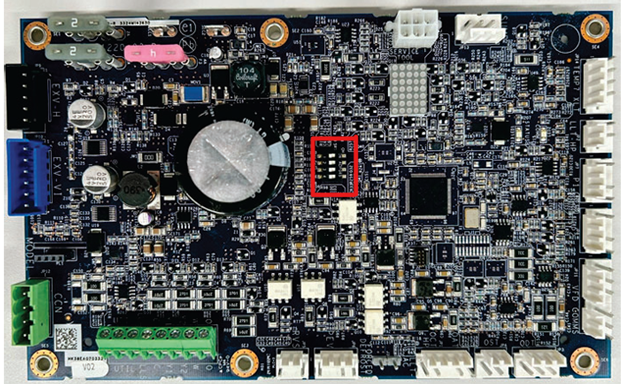
The Primary Control Module (PCM) controls various functions of the outdoor unit. These functions are determined by the inputs the PCM receives and outputs it sends out. When this board fails and needs to be replaced the board needs to know what tonnage unit it is going into. The Carrier Green Speeds and Bryant Extreme variable speed units use these PCM boards that need the model plug configuration. Some models are the 27VNA HP’s, 26VNA A/C’s, 191VNA A/C’s, & the 290VNA HP’s models.

Printed circuit board with a red-outlined component near center, connectors around the edges.

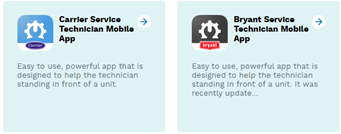
The PCM has been pre-programmed at the factory with an electronic model plug. This electronic model plug removes the need for a physical model plug to be installed into the PCM. The electronic model plug configuration establishes the, tonnage and type of unit. If the PCM has to be replaced or the model configuration is unknown, there are several ways to set the model configuration. The Infinity or Connex wall control, the Service Tech App, or the PCM dip switches can be used to configure the PCM.

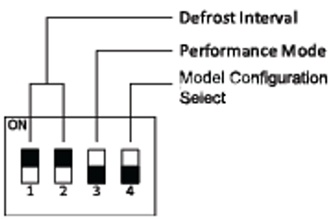
Diagram of four black ON/OFF switches labeled 1–4 with callouts for defrost interval, performance mode, and model select

To set the model configuration, you will have to enter the Menu Mode by setting the DIP switch #4 to ON at the PCM board. When DIP switch #4 is set to ON, a list of compatible PCM Model values will scroll across the marquee depending on the VFD model detected. When the desired PCM model shows on the marquee, turn DIP switch #4 to OFF. Here is an example, if a 5 Ton VFD model is detected; the list of compatible PCM models would be 60K-AC, 60K-HP, and NOCFG. To set the PCM’s model flip the DIP switch #4 on the PCM to OFF when the desired tonnage is being scrolled across the marquee. When a model is selected by setting DIP switch #4 OFF, the selected model is displayed on the 5×7 display for 2 minutes. A power cycle is then required for the model configuration to be established in the PCM memory.

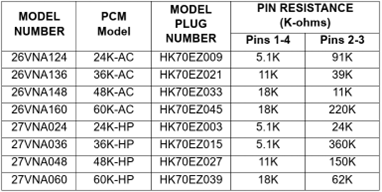
Table listing motor model, PCM model, plug, and pin resistance values.
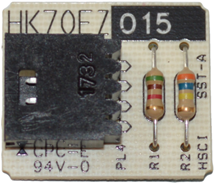
Close-up of a circuit board with a black chip, two resistors, and printed labels on a white background

The above is physical model plugs that can be ordered if needed to plug directly on to the PCM board.


An electronically set model configuration will take effect immediately. The PCM remembers the most recent valid model configuration detected at power-up, regardless of that configuration coming from an electronic or physical model plug. Model configuration is stored in the PCM’s memory so power cycles will not erase this information. A physical model plug at power-up takes precedence over a model configuration stored in memory. If a new valid model plug value is detected at power-up, the model configuration memory will be updated to that new value.


Just remember that when replacing the control boards that the physical model plug is not there and it will need to be programed from the PCM board, or Bryant/Carrier Tech APP, wall control, or a physical model plug.

Two app cards for Carrier Service Technician Mobile App, one blue and one gray, with text about easy setup and an update.
Thermostat display showing 72° and clear weather with sun icon, room temp, and May 2, 2018, 9:40a

Sources:


Infinity® Series Variable Speed Air Conditioner and Heat Pump with Greenspeed® Intelligence Using Puron Advance™ (R-454B) Refrigerant Service Manual / Edition Date: 05/25


Disclaimer: The technical statements, information and recommendations contained herein are believed to be accurate as of the date hereof, but Mingledorff’s does not make representations or warranties, express or implied, as to its accuracy, its completeness, or the results to be obtained. The information is being provided for informational purposes only and is intended for use by persons having adequate skill and expertise regarding the proper selection, use and application of the products and recommendations and at their own risk and discretion.


More to Explore

September 16, 2026
Disclaimer: The technical statements, information and recommendations contained herein are believed to be accurate as of the date hereof, but Mingledorff’s does not make representations or warranties, express or implied, as to its accuracy, its completeness, or the results to be obtained. The information is being provided for informational purposes only and is intended for use by persons having adequate skill and expertise regarding the proper selection, use and application of the products and recommendations and at their own risk and discretion. 

By Jesse Van Atta September 16, 2026
Disclaimer: The technical statements, information and recommendations contained herein are believed to be accurate as of the date hereof, but Mingledorff’s does not make representations or warranties, express or implied, as to its accuracy, its completeness, or the results to be obtained. The information is being provided for informational purposes only and is intended for use by persons having adequate skill and expertise regarding the proper selection, use and application of the products and recommendations and at their own risk and discretion.